How to Make a Favicon From a Logo SVG
A favicon is your logo shrunk to 16 or 32 pixels and shown in a browser tab. Most full logos do not survive that. The fix is a clean SVG, a simpler version of the mark, and two or three small files for the places that do not read SVG.
Start with a clean SVG
If you only have a PNG of your logo, trace it first. Open the logo to SVG tool and drop the file in. Pick the Logo or icon (few colors) style and set Colors to the number of flat colors in the mark. Use the preview slider to compare, then download the SVG.
Two things matter for a favicon:
- Start from the biggest copy of the logo you can find. A 150 pixel avatar traces into blocky shapes, and those stay blocky when scaled down.
- Make sure there is no background box. If a white square shows up behind the logo, the transparent background guide shows how to remove it. A white box on a dark browser tab looks like a mistake.
Simplify the mark before you shrink it
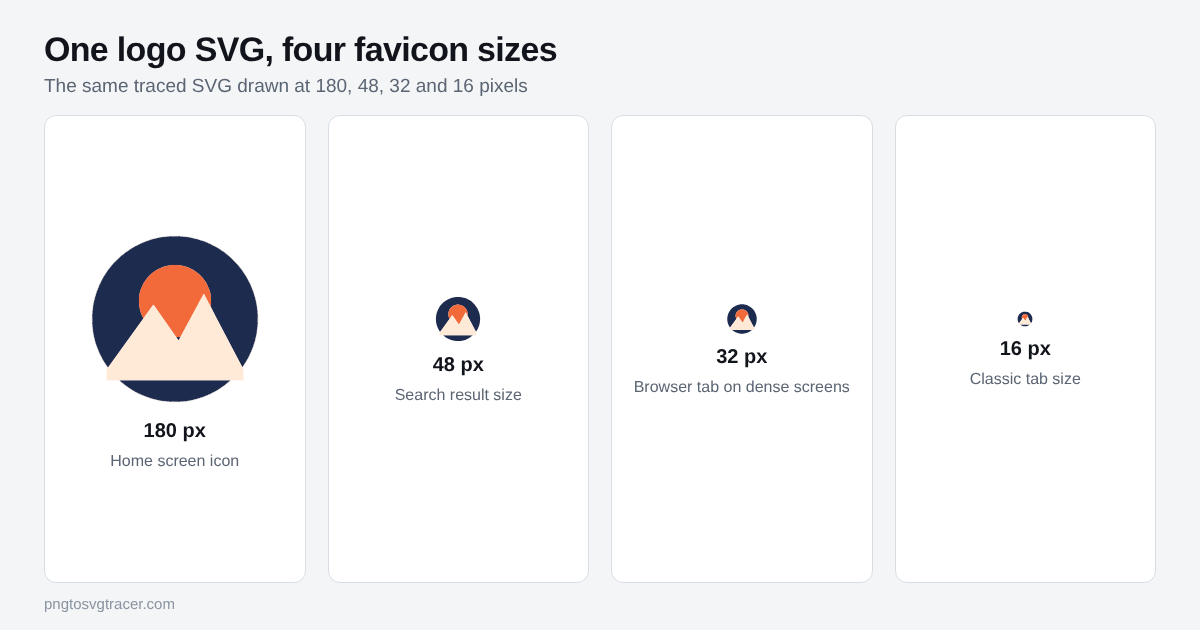
Look at the 16 pixel version in the figure. The sun and mountains are still there, but the detail is gone. That is the normal outcome, not a tracing problem.
Before you export, decide what the favicon should be:
- Icon only: if your logo has a symbol, use just the symbol. Drop the wordmark. Text under about 24 pixels tall turns into a smudge.
- Single letter: if the logo is mostly text, use the first letter or initials in a bold shape.
- Fewer shapes: delete thin lines and small details. Open the SVG in a free editor such as Inkscape and remove them there. The Inkscape guide covers the basics.
- Square canvas: center the mark with a little padding. Browsers crop and round favicons in different ways, so keep the art away from the edges.
A quick test: shrink your browser window to see the mark at about 16 pixels on screen, or zoom out on the SVG until it is tiny. If you cannot tell what it is, simplify further.
Which files you need
| File | Size | Used for |
|---|---|---|
| favicon.svg | any | Browser tabs in browsers that support SVG icons |
| favicon-32.png or favicon.ico | 32 x 32 | Browsers and tools that do not use the SVG |
| apple-touch-icon.png | 180 x 180 | iPhone and iPad home screen |
Chrome, Edge and Firefox accept an SVG favicon. Safari has been slower to support it, so check the Safari version your visitors use and keep a PNG fallback either way. Google asks for a favicon that is a multiple of 48 pixels square for search results, and says SVG works, so the same SVG covers that too.
This tool gives you the SVG. It does not export PNG or ICO files. To make the PNG sizes, use the SVG to PNG converter at 32 and 180 pixels wide, or open the SVG in Inkscape. The export guide explains how to pick the width.
Add it to your site
Put the files in your site root and link them from the head section of every page. You need three link tags:
- An icon link with rel set to "icon", pointing to /favicon.svg, with type "image/svg+xml".
- A second icon link pointing to /favicon-32.png, with sizes "32x32" and type "image/png".
- A link with rel set to "apple-touch-icon", pointing to /apple-touch-icon.png.
Your site builder or theme probably has a favicon setting that writes these for you. Use it if it does.
Browsers cache favicons hard. If you swap the file and still see the old one, open the icon URL directly, refresh it, or try a private window.
Check it
Open your site and look at the tab at normal size. Then check it on a phone, because the home screen icon is 180 pixels and any mistake in the padding shows up there. Look at it in both light and dark browser themes. A dark logo on a transparent background can disappear on a dark tab. If that happens, put the mark on a solid rounded square in your brand color.
Open the SVG in a browser tab as a last check. If it looks right there, it will look right as a favicon.
Where this fits
The favicon is one more place your logo has to work, next to the header, email signature and social card. If you are still deciding which file format goes where, website logo formats: SVG vs PNG vs WebP covers it. If you want to start from a PNG, the PNG to vector converter does the same trace.
Only trace a logo you own or have permission to use.
Related tools
Keep reading
- GuidesWebsite Logo Formats: SVG vs PNG vs WebPWhich file format should your website logo be? A plain comparison of SVG, PNG and WebP, with real file sizes from one logo and when to trace to SVG.November 11, 2026 · 4 min read
- TutorialsHow to Make a Transparent Background SVG from a PNGTurn a PNG or JPG logo into an SVG with no white box behind it. Which setting to use, how to check it worked, and what to do when a pale background stays.November 8, 2026 · 4 min read
- TutorialsHow to Open and Edit an SVG in Inkscape (Free)Trace a PNG or JPG to SVG, open it in free Inkscape, then recolor shapes, delete a background, merge pieces and save a clean file. Step by step.November 8, 2026 · 4 min read